Flow Control in Availability Groups and SQL Server 2022
What is Flow Control?
Flow control in Always On Availability Groups refers to mechanisms that control the rate at which data changes are sent from the primary replica to the secondary replicas. The goal is to ensure that the secondary replicas are kept up-to-date with the primary replica while avoiding overwhelming the network or the secondary replicas themselves.
Data synchronization process
To estimate the time to full synchronization and to identify the bottleneck, you need to understand the synchronization process. Performance bottleneck can be anywhere in the process, and locating the bottleneck can help you dig deeper into the underlying issues. The following figure and table illustrate the data synchronization process:
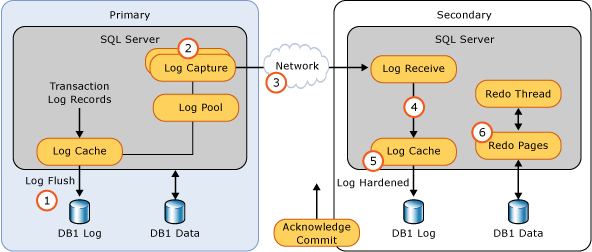

Two Levels of Flow Control
In SQL Server Always On Availability Groups, the transaction log messages from the primary replica to the secondary replicas are managed through a mechanism that involves two levels of flow control:
Replica-Level Flow Control:
- Primary-to-Replica Flow Control: Each secondary replica has a threshold for the number of log messages that can be sent from the primary replica before flow control is engaged. If the number of unacknowledged log messages exceeds this threshold, the primary replica will pause sending additional log messages to that particular secondary replica until acknowledgments are received for the previously sent messages. This prevents the secondary replica from being overwhelmed with too many log messages at once.
Database-Level Flow Control:
- Database-Specific Thresholds: In addition to controlling the flow of log messages at the replica level, SQL Server also implements flow control at the database level. Each database within an Availability Group can have its own thresholds for log message delivery. This means that if the threshold for a specific database is reached, log messages for that database will be paused until acknowledgments are received, while other databases in the same Availability Group can continue to receive log messages as long as their thresholds are not exceeded.
How It Works
Message Thresholds: SQL Server tracks the number of log messages sent to each secondary replica. When the number of unsent log messages reaches a predefined threshold, flow control is triggered. This prevents the secondary replica from being flooded with log data, which can be crucial for maintaining system stability and performance.
Acknowledgment Messages: Once the secondary replica processes the log messages and sends an acknowledgment back to the primary replica, the primary replica resumes sending log messages to that replica. The primary replica adjusts the flow based on the current acknowledgment status to ensure that the number of outstanding messages remains within acceptable limits.
Dynamic Adjustment: SQL Server dynamically adjusts the flow of log messages based on the acknowledgments received and the current load on the secondary replicas. This helps maintain a balance between the rate of log message delivery and the capacity of the secondary replicas to process and apply those logs.
Message Thresholds: SQL Server tracks the number of log messages sent to each secondary replica. When the number of unsent log messages reaches a predefined threshold, flow control is triggered. This prevents the secondary replica from being flooded with log data, which can be crucial for maintaining system stability and performance.
Acknowledgment Messages: Once the secondary replica processes the log messages and sends an acknowledgment back to the primary replica, the primary replica resumes sending log messages to that replica. The primary replica adjusts the flow based on the current acknowledgment status to ensure that the number of outstanding messages remains within acceptable limits.
Dynamic Adjustment: SQL Server dynamically adjusts the flow of log messages based on the acknowledgments received and the current load on the secondary replicas. This helps maintain a balance between the rate of log message delivery and the capacity of the secondary replicas to process and apply those logs.
Importance
This flow control mechanism is essential for several reasons:
- Performance and Stability: It prevents secondary replicas from being overwhelmed by excessive log data, which could degrade performance or lead to errors.
- Efficient Data Replication: Ensures that log data is replicated efficiently and consistently across all secondary replicas, maintaining data integrity and synchronization.
- Network Management: Helps manage network bandwidth and reduces the risk of network congestion by controlling the rate at which log messages are sent.
Once the message threshold of either gate is reached, log messages are no longer sent to a specific replica or for a specific database.

Two useful performance counters, SQL Server:Availability Replica > Flow control/sec and SQL Server:Availability Replica > Flow Control Time (ms/sec), show you, within the last second, how many times flow control was activated and how much time was spent waiting on flow control. Higher wait time on the flow control translate to higher RPO.
For more details please ref:https://learn.microsoft.com/en-us/sql/database-engine/availability-groups/windows/monitor-performance-for-always-on-availability-groups?view=sql-server-ver16&tabs=new-limits


No comments:
Post a Comment